SoundPainter Conductor is pending approval in Foundry's package browser.
Until then, install manually by following the steps below.
1. Install the module in Foundry
- Download the module (zip)
- Unzip it.
- Copy the folder into your Foundry
Data/modules/directory. - In Foundry: Settings → Manage Modules → enable SoundPainter.io Conductor.
2. Generate your SoundPainter token
You'll need a SoundPainter account to stream. Open SoundPainter, sign in, then open the broadcast panel and choose Foundry Setup. Click Copy to get your long-lived API token.
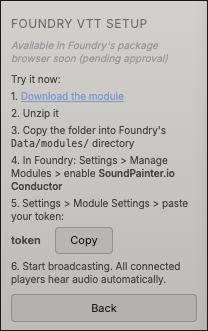
3. Paste the token into Foundry
In Foundry: Settings → Module Settings → SoundPainter.io Conductor. Paste your token into the API Token field. Leave Auto-Connect checked so the module connects as soon as a game starts.
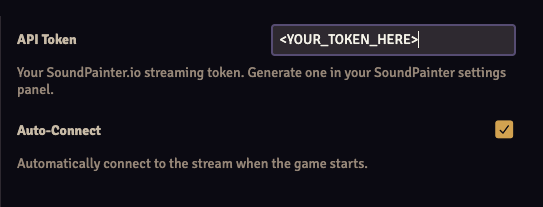
4. Start broadcasting
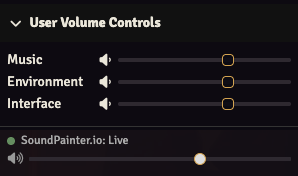
Back in SoundPainter, hit Broadcast. Every connected Foundry player will hear your scene audio routed through Foundry's built-in environment volume, with a live indicator in their player-volume controls.
Compatibility
Foundry v12 and newer, verified on v14. The module avoids ApplicationV2 subclassing so it works cleanly across v12–v14.